Living Like This: How Top Developers Work with AI Coding Assistants
Table of Contents
Based on this video. My notes on becoming a better developer with AI assistants.
You’re probably leaving most of your AI coding assistant’s potential on the table. Not because the tools aren’t powerful—they are. But because you don’t have a system.
The core principle: AI output quality = context quality. Everything below serves this.
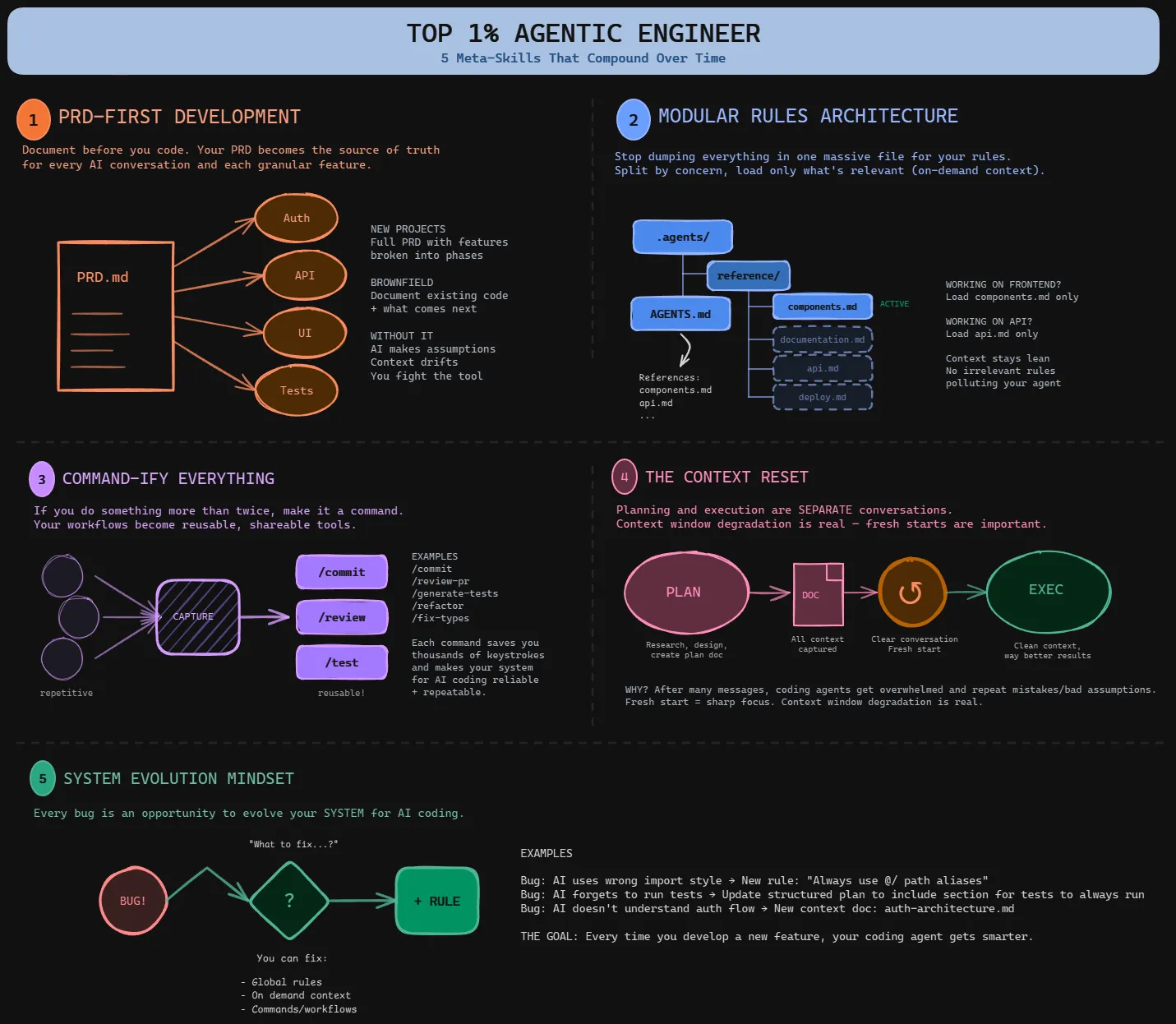
1. PRD-First DevelopmentLink to heading
What it is: A single markdown document defining your entire project scope—your north star.
What goes in:
- Target users & mission statement
- What’s in scope / out of scope (be explicit)
- Tech stack & architecture decisions
- Feature list with priorities
- Non-functional requirements (performance, security)
Implementation:
Create a /create-prd command in .claude/commands/create-prd.md:
# Create PRD Command
Based on our conversation, generate a PRD at `docs/prd.md` with:
## Project Overview
- Target users- Mission statement- Success metrics
## Scope
- In scope: [explicit list]- Out of scope: [what we're NOT building]
## Architecture
- Tech stack with rationale- Key architectural decisions- Third-party services
## Features
Priority-ordered feature list with descriptions
## Technical Constraints
- Performance requirements- Security requirements- Browser/platform support
The workflow:
- Discuss what you want to build with your AI
- Run
/create-prdto generatedocs/prd.md - Review and refine the PRD
- Daily question: “Based on the PRD, what should we build next?”
- Update PRD as project evolves
Why it works: Your AI understands the bigger picture. Features connect. Context accumulates instead of getting lost. When your AI reads the PRD before planning, it makes decisions aligned with your overall vision—not just the immediate task.
2. Modular Rules ArchitectureLink to heading
The problem: Most global rules files are too long. Every word loads into every conversation, wasting context.
The solution: Keep global rules short. Load task-specific rules only when needed.
Global rules structure (.claude/claude.md):
# Project Rules
## Tech Stack
- Frontend: React + TypeScript + Vite- Backend: Node.js + Express- Database: PostgreSQL- Deployment: Vercel + Railway
## Project Structure
/src/components/api/lib/types
## Core Commands
- npm run dev - Start dev server- npm test - Run tests- npm run build - Production build
## Code Conventions
- Use named exports- Prefer const over let- TypeScript strict mode- ESLint + Prettier
## Reference Documentation
When working on specific tasks, read these:
- API Development: `.claude/reference/api-development.md`- Frontend Components: `.claude/reference/frontend-components.md`- Database: `.claude/reference/database.md`- Deployment: `.claude/reference/deployment.md`
Task-specific reference (.claude/reference/api-development.md):
# API Development Reference
## Endpoint Structure
All endpoints in `/src/api/routes/`
## Error Handling
- Use custom ApiError class- Return consistent error shapes:  { error: string, code: string, details?: object }
## Validation
- Zod schemas for request validation- Validate at route handler entry
## Authentication
- JWT tokens via middleware- Extract user from req.user- Use requireAuth() middleware
## Testing
- Supertest for integration tests- Mock external services- Test error cases
Implementation steps:
- Create
.claude/directory in your project root - Write short global rules (< 200 lines)
- Create
.claude/reference/directory - Split specialized knowledge into reference docs (can be 500-1000+ lines each)
- Reference them in global rules
Why it works: Your AI gets comprehensive context without overwhelming the context window. A 200-line global rules file + 800-line API reference (loaded only when needed) beats a 2,000-line rules file that wastes tokens on frontend conventions when you’re building APIs.
3. Commandify EverythingLink to heading
The rule: Prompt something twice? Make it a command.
Essential commands to create:
/prime- Load project context/create-prd- Generate PRD/create-plan- Output structured plan/execute- Implement from plan/commit- Git commit with proper message/review- Code review checklist
Example: The Prime Command (.claude/commands/prime.md):
# Prime Command
Load context needed to start working:
1. Read PRD at `docs/prd.md`2. Review recent commits: `git log -10 --oneline`3. Check current status: `git status`4. Read global rules at `.claude/claude.md`5. Scan project structure6. Identify blocking issues or incomplete work
Output a summary:
- **Current state:** Brief project status- **Recent changes:** What was done recently- **From PRD:** What we're working toward- **Suggested next steps:** Based on PRD priorities
Example: The Plan Command (.claude/commands/create-plan.md):
# Create Plan Command
Generate a structured plan at `docs/plans/[feature-name].md`:
## Feature Overview
- Feature name- User story- Success criteria
## Technical Approach
- Architecture decisions- Files to create/modify- Dependencies needed
## Implementation Tasks
1. [Specific task 1]2. [Specific task 2]   ...
## Testing Strategy
- Unit tests to write- Integration tests- Manual testing steps
## Validation Checklist
- [ ] Tests passing- [ ] Linting clean- [ ] Types valid- [ ] Manual testing complete
Implementation:
- Create
.claude/commands/directory - Add one command at a time (start with
/prime) - Test and refine each command
- Build your command library over 2-3 weeks
One command replaces 5-10 minutes of setup. Saves thousands of keystrokes over time.
Get started: Check out the Habit Tracker repo with all command templates.
4. The Context ResetLink to heading
The pattern: Always restart your conversation between planning and execution.
Why: Planning is exploratory—full of dead ends, tangents, and options you rejected. If you go straight from planning to coding, all that noise pollutes the context window. Your AI has less room to reason about implementation.
Planning phase:
/prime- Load project context- “Based on PRD, what’s next?” - Discuss options
- Read relevant code, explore approaches
/create-plan- Output todocs/plans/feature.md
[Clear context - close conversation or run /clear]
Execution phase:
- New conversation
/execute docs/plans/feature.md- AI reads ONLY the plan (not the messy planning conversation)
- Clean context = focused implementation
The execute command structure:
# Execute Command
Implement the plan at the specified path.
1. Read the plan document2. Understand all tasks and acceptance criteria3. For each task:   - Implement the change   - Write tests   - Run validation4. After all tasks:   - Run full test suite   - Check linting   - Verify types   - Manual smoke test5. Report any issues or deviations from plan
Why it works: The plan contains everything needed (what to build, how to build it, files to change, tests to write). The planning conversation contained everything NOT needed (rejected ideas, exploratory reading, dead ends). Separating them gives your AI maximum reasoning space.
5. System Evolution MindsetLink to heading
The insight: Every bug is an opportunity to strengthen your AI.
Wrong approach:
- Find bug → fix manually → move on → same bug next week
Right approach:
- Find bug → “What in my rules/commands allowed this?” → Fix the system → Never happens again
Implementation workflow:
After completing a feature and finding issues:
-
Document what went wrong
Issues found:- AI used `require()` instead of `import`- Forgot to run linter before committing- Didn't update tests in `/tests/api/`- Validation logic had edge case bug -
Start reflection conversation
I noticed these issues after implementation. Let's review:- The rules in `.claude/claude.md`- The commands we used: `/create-plan` and `/execute`- The plan document at `docs/plans/feature.md`What should we improve so these issues don't happen again? -
Let AI propose fixes AI might suggest:
- Add import rule to global rules
- Update
/executecommand to include linting step - Add test update requirement to plan template
- Create validation reference doc
-
Implement improvements Update your system files based on suggestions
-
Validate next feature Those issues shouldn’t recur
Common fix patterns:
| Problem | System Fix |
|---|---|
| Wrong import style | Add one-line rule in global rules |
| Forgets tests | Add “Tests” section to plan template |
| Doesn’t understand auth | Create reference/authentication.md |
| Skips validation | Add validation steps to /execute command |
| Inconsistent error handling | Create reference/error-handling.md |
| Doesn’t run linter | Add linting to /execute validation steps |
| Misunderstands architecture | Expand PRD architecture section |
| Hardcodes values | Add “No magic numbers” to code conventions |
Why it compounds:
- Week 1: 20 mistake types
- Week 4: 10 mistake types
- Week 8: 5 mistake types
- Week 16: Rarely new mistakes
Your AI gets more reliable every day. The model didn’t improve — your system did.
The mindset shift:
- From: “This AI is unreliable, I have to fix everything”
- To: “This bug reveals a gap in my system, let me close that gap”
One is frustrating. The other is empowering and compounds.
The Daily WorkflowLink to heading
Morning:
/prime- Load project context- “Based on PRD, what’s next?” - Get direction
- Discuss and explore approaches
/create-plan- Output structured plan
[Context reset - close conversation]
Implementation:
- New conversation
/execute docs/plans/feature.md- Clean execution- Build the feature with clean context
- Validate manually after implementation
- Note any issues
System Evolution:
- Document problems encountered
- “Let’s improve the system to prevent these issues”
- Update rules, commands, or reference docs
- Commit system improvements
Repeat:
Each cycle: stronger system, more reliable AI, faster shipping.
The Meta-LessonLink to heading
All five techniques manage context strategically:
- PRD = north star context (what we’re building)
- Modular rules = just-in-time context (how we build it)
- Commands = process context (repeatable workflows)
- Context resets = eliminate noise (clean slate for execution)
- System evolution = improve context quality (compound over time)
Master context management = master AI-assisted development.
Start HereLink to heading
Don’t implement everything at once. Ramp up over 5 weeks:
Week 1: Create PRD + prime command Week 2: Add plan/execute workflow + context resets Week 3: Commandify common prompts (commit, review) Week 4: Start system evolution after each feature Week 5: Implement modular rules architecture
By week 6, the difference is obvious.
ResourcesLink to heading
- Video: Watch the full video for detailed examples
- Course: Dynamous Agentic Coding Course - Full system for reliable AI coding
- GitHub Repo: Habit Tracker with all commands - Command templates and examples
- Workflow Diagram: Visual system overview
All credit to the video creator for these techniques. This is my condensed reference—watch the original for the complete system.